Перейти к содержимому
Ksenukai.lv logo
Корзина

не число товаров


Всего
Перейти в корзину
Монитор Dell P2725HE, IPS, 100 гц, FHD, 27″ | Компьютерная техника, товары для офиса | Ksenukai.lv | 0
Монитор Dell P2725HE, IPS, 100 гц, FHD, 27″ | Компьютерная техника, товары для офиса | Ksenukai.lv | 1
Монитор Dell P2725HE, IPS, 100 гц, FHD, 27″ | Компьютерная техника, товары для офиса | Ksenukai.lv | 2
Монитор Dell P2725HE, IPS, 100 гц, FHD, 27″ | Компьютерная техника, товары для офиса | Ksenukai.lv | 3
Монитор Dell P2725HE, IPS, 100 гц, FHD, 27″ | Компьютерная техника, товары для офиса | Ksenukai.lv | 4
Монитор Dell P2725HE, IPS, 100 гц, FHD, 27″ | Компьютерная техника, товары для офиса | Ksenukai.lv | 0
Монитор Dell P2725HE, IPS, 100 гц, FHD, 27″ | Компьютерная техника, товары для офиса | Ksenukai.lv | 1
Монитор Dell P2725HE, IPS, 100 гц, FHD, 27″ | Компьютерная техника, товары для офиса | Ksenukai.lv | 2
Монитор Dell P2725HE, IPS, 100 гц, FHD, 27″ | Компьютерная техника, товары для офиса | Ksenukai.lv | 3
Монитор Dell P2725HE, IPS, 100 гц, FHD, 27″ | Компьютерная техника, товары для офиса | Ksenukai.lv | 4

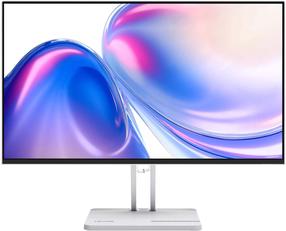
Монитор Dell P2725HE, IPS, 100 гц, FHD, 27″

Артикул товара: 1636178


Dell-logo


Цена лояльности

293,59 €

Обычная цена

329,00 €

Электронная цена

Монитор Dell P2725HE, IPS, 100 гц, FHD, 27″

Монитор Dell P2725HE, IPS, 100 гц, FHD, 27″

Обычная цена

329,00 €

Цены в физических магазинах могут отличаться.

Лизинг


Остатки в физических магазинах

Нет остатков в магазинах. Этот товар можно приобрести только онлайн.

Часто покупают вместе

Информация о товаре

Характеристики товара

Общие характеристики

Тип продуктаМониторы
БрендDell
Тип монитораLED мониторы
МодельP2725HE
ЦветСеребристый цв., Черный цв.
Класс энергоэффективностиD
Шкала классов энергоэффективностиA - G
Материал корпусаПластик

Экран

Тип экранаIPS
Диагональ экрана27 ″
Тип яркости экранаFHD
Разрешение дисплея1920 x 1080
Форма экранаПлоский
Частота экрана100 гц
Тип поверхности экранаФактура: матовая
Время реакции8 ms
Горизонтальный угол наблюдения178 град
Вертикальный угол наблюдения178 град
Контрастность1500 : 1
Яркость, cd/м²300
Сенсорный экранНет
Функция 3DНет

Подключение и соединение

Число разъемов USB 3.x3
Тип портов2 x DisplayPort, 2 x USB-C , 3 x USB 3.2, HDMI, RJ-45
Число разъемов HDMI1
Доступна функция дистанционного управленияНет
Hапряжение100 - 240 В
БеспроводнойНет

Встроенные дополнительные устройства

Функция TVНет
Встроенные динамикиНет

Габариты и вес

Ширина53.78 см
Высота49.61 см
Глубина17.9 см
Вес3.81 кг

Дополнительно

Для игрНет
РегулируетсяВысота, Наклон, Поворот
Подходит для монтажа к стенеДа
Стандарт VESA100 x 100
nVidia G-SyncНет
AMD FreeSyncНет
Право предъявления претензии для физических лиц24 месяц
Право предъявления претензии для юридических лиц12 месяц

Заметил ошибку в описании товара, в таблице характеристик или в галерее фотографий? Сообщи нам об этом

Цвет товара может отличаться от того, что видно на фотографии.

Monitor with USB-C Hub - P2422HE

Don't slow down wherever you work. Reduce harmful blue light with this slim 23.8" FHD monitor with hub and ComfortView Plus.

Better images from anywhere
  • Comfort without color degradation: Give your eyes greater comfort with built-in ComfortViewPlusi, which continuously reduces the emission of potentially harmful blue light while enabling accurate color reproduction.
  • Always consistent colors: In-Plane Switching technology ( IPS ) technology allows you to enjoy consistent, vivid colors across a wide viewing angle. Thanks to 99% sRGB coverage, you will get accurate color reproduction as standard.
  • Elegance, style and order: hide cables in the monitor pedestal to keep things tidy. This elegant monitor features an ultra-slim 3-sided bezel, a small stand, and an improved, easy-to-use cable management system.
  • Comfort comes first: the ability to tilt, rotate vertically and horizontally, and adjust the monitor height (up to 150 mm) provides additional comfort while working.
  • Designed with you in mind: The easy-to-use joystick allows you to conveniently navigate menus and adjust screen settings. You can attach the optional Dell Slim Soundbar (SB521A) to your monitor to enjoy exceptional sound quality.
Great connectivity and greater productivity
  • Productivity center: Turn your monitor into a productivity center with an RJ45 port for wired Ethernet and USB-C with up to 65W of power - all without cluttering your desk.
  • Greater management capabilities: Built-in convenient features include MACi address forwarding, PXE boot and Wake-on-LAN.
  • Convenient single-cable connectivity: Reduce the number of cables on your desk with the USB-C connector, which allows you to connect devices from different manufacturers, saves up to 72% of time preparing the workstation, reduces cable clutter and enables quick replacement of people using a given workstation.
  • Boost your productivity quickly: Just press the monitor's power button and the power sync feature will turn on the monitor and the connected Dell computer at the same time, even when the laptop lid is closed. This feature is available on select Dell computers.
  • Multiple connectivity options: you can easily connect the monitor to many different devices, including: via HDMI, DisplayPort, DisplayPort (output), USB-C, RJ45 and 4 super-fast 5 Gb/s USB ports.
  • Quick access ports: Share and transfer content easily using the ports on the front of the display.
  • Increased productivity: To increase productivity by up to 39%, connect a keyboard , mouse and 2 monitors as productivity hubs using Dell Express daisy-chaining. With this feature, the second monitor is automatically detected, so you don't have to manually change the OSD settings. Boost your productivity even further with Dell Easy Arrange multitasking tools.
Dell Display Manager

  • Consistent productivity: EasyArrange helps you quickly arrange multiple application windows across available screens. You can choose 1 of 38 ready-made layouts and personalize up to 5 windows, which makes it much easier to perform multiple tasks at the same time.
  • Smooth transitions: Automatic recovery remembers the layout of windows and applications when you interrupt your work and restores the final state even if the monitor is unplugged.
  • Convenient shortcuts: Hotkeys let you easily configure display management settings so you can get started faster.
  • Manage in multiple ways: With asset management reports, an IT manager can quickly capture and track monitor information and configure multiple monitors simultaneously in one process.
An ecological approach with the present and future in mind

  • Environmental Standards: The monitor complies with the latest environmental regulations and standards such as EnergyStar®, EPEAT® Goldi. He also obtained the TCO certificate.
  • Eco-friendly packaging: To reduce the environmental impact of manufacturing, the monitor's packaging is made from at least 75% recycled cardboard and is Styrofoam-free.
  • Energy Saving: Save electricity with PowerNapi, which dims the screen or puts it to sleep mode when the monitor is not in use.
  • Supporting Sustainability: Dell Technologies is committed to reducing environmental impact at every stage of the product lifecycle. Find out more about our sustainability and social impact efforts through 2030. You can find more information about the carbon footprint of our products.
Connectivity options

1. Security lock slot | 2. Power connector | 3. HDMI port | 4. Base lock | 5. DisplayPort (input) | 6. DisplayPort (output) | 7. Upstream USB Type-C port | 8. Super-fast 5Gb/s downstream USB port (4) | 9. RJ45 port

Часто покупают вместе

Беспроцентный лизинг на 12 мес.

OLED монитор MSI MAG 271QP, QD-OLED X28, QD-OLED, 280 гц, WQHD, 27″

Отзывы

Посетители также интересовались

Недавно просмотренные