Preces apraksts angļu valodā
It’s hard to look away
Easy on the eyes: ComfortView Plus is an always-on, built-in low blue light screen that optimizes eye comfort by reducing potentially harmful blue light emissions while delivering excellent color accuracy.i
Color consistency comes standard: See consistent, vibrant colors across a wide viewing angle enabled by In-Plane Switching (IPS) technology. With 99% sRGB coverage to an accuracy of Delta-E less than 2, you get precise hues right out of the box.
See more, scroll less: Boost productivity with an extended vertical view on this 24"【610 mm】 16:10 WUXGA (1920 x 1200) display which provides 11% more on-screen real estatei.
Your productivity hub
Connect to productivity: With connectivity options like RJ45i and USB-C®, your monitor delivers robust Ethernet and power (up to 90W)—all in a clutter-free setup.
Quick access: Conveniently placed SuperSpeed USB 5Gbps and USB-C ports located at the front of the monitor allow quick connections to storage devices, mobile phones and other peripherals while enabling up to 15W of power delivery (via USB-C).
Enhanced manageability: Managing your monitor is easy with MAC Address pass-through, PXE Boot, and Wake-on-LAN conveniently built in.
Set up for more: DP out connectivity enables a multi-monitor setup by daisy chaining up to three monitors.
A step forward in design
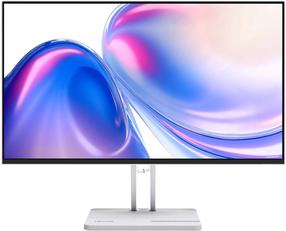
Beauty meets function: Masterfully crafted with a premium platinum silver finish, small base and an elegant cable management system that hides cords within the monitor riser.
Easy to use: Navigate the menu and adjust screen settings with the joystick control. We’ve also given you the option to snap on the Dell Slim Soundbar (SB521A)i and enjoy exceptional sound quality.
Comfort is key: Tilt, swivel, pivot and adjust the height of your monitor to a maximum of 150mm because you should be comfortable while you work.
Expand your efficiency: Experience a seamless view across multiple monitors with the virtually borderless InfinityEdge design. And, with a dual monitor setup, you can increase your productivity by up to 21%i.
Green thinking: For today and tomorrow
Environmental standards: This monitor meets the latest regulatory and environmental standards such as EnergyStar®, EPEAT® Goldi, and TCO certified.
Eco-conscious packaging: To reduce our manufacturing impact on the environment, this monitor is shipped Styrofoam-free and the packaging is made of at least 75% recycled cardboard.
Energy conservation: Save energy when your monitor is not in use with PowerNapi, a feature that dims or puts your monitor to sleep when it’s not in use.
Advancing sustainability: Dell Technologies is committed to reducing environmental impact throughout the product lifecycle. Read more about our commitment to sustainability and our 2030 Social Impact goals here,and our product’s carbon footprint here .
Green thinking: For today and tomorrow
Dell Display Manager
Productive at every level: Easy Arrange allows you to easily tile multiple applications across one or more screens with 38 pre-set window partitions and the ability to personalize up to five windows, giving you improved multitasking abilities.
Seamless transitions: The auto-restore feature remembers where you left off, so applications will go back to where you left them, even after you’ve unplugged.
More ways to manage: Asset management reports allow IT managers to quickly capture and track monitor information as well as configure multiple monitors at once through a single setup.
The key to convenience: Shortcut keys can save you even more time, letting you easily configure your display management settings so you can get to work faster.