Информация о товаре
Описание товара на английском языке:
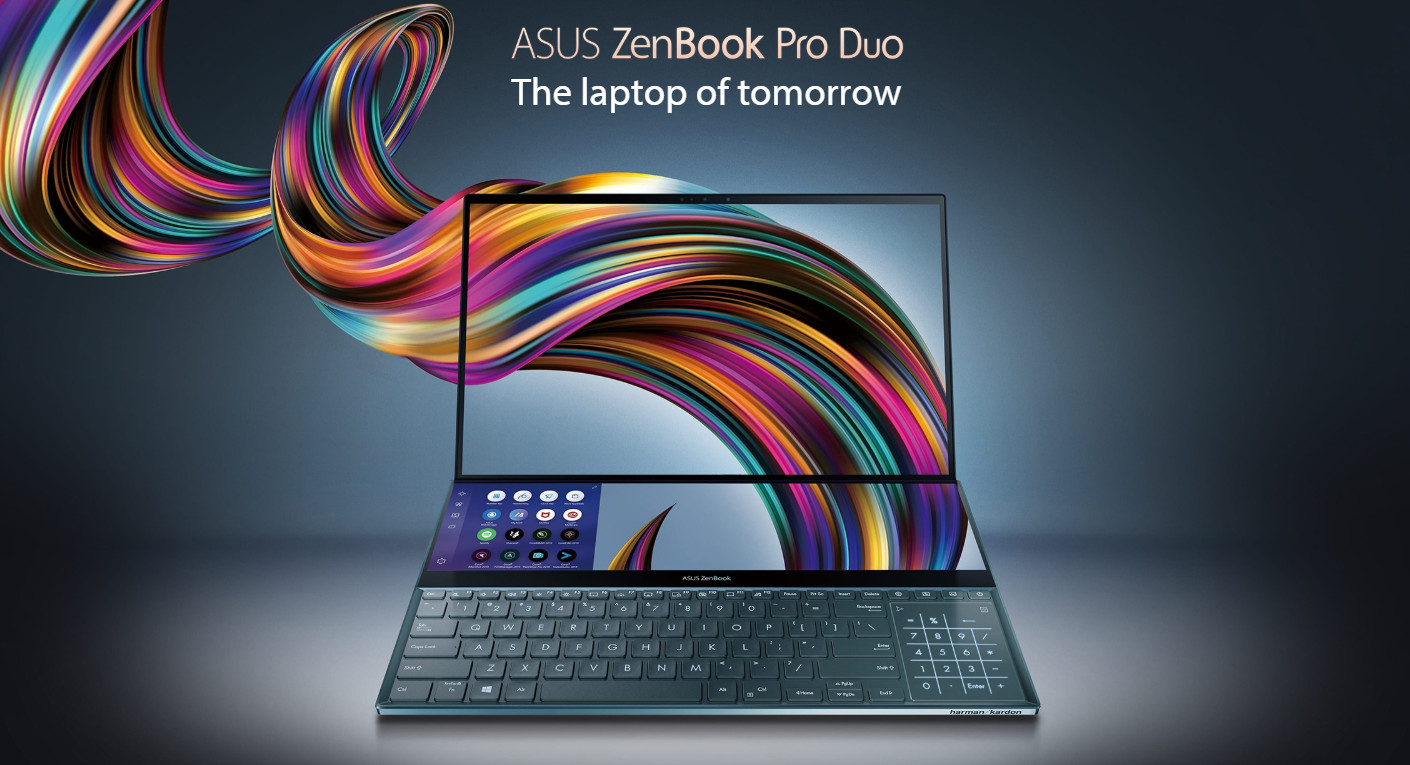
Take your creativity and productivity to the next level with the groundbreaking ASUS ZenBook Pro Duo! Designed to give you the ultimate edge in workflow efficiency, the powerful RTX Studio Laptop features a full-width 4K ASUS ScreenPad™ Plus that works seamlessly with the main 4K UHD OLED display. It’s never been this easy to harness your full creative power.
Reflect your personalized style
The brand new Celestial Blue color draws its inspiration from the future, and gives ZenBook Pro Duo a sophisticated air of timeless innovation. As befits such a revolutionary concept, it’s also decorated with a unique asymmetric version of the iconic Zen-inspired spun-metal finish: an intriguing design detail that gives ZenBook Pro Duo a totally unmistakable identity. The edges are finished with wide, mirror-finished diamond-cut edges that reflect your surroundings to add a subtle touch of ambient style: in effect, you’re in charge of your laptop’s design.
Experience ultimate productivity
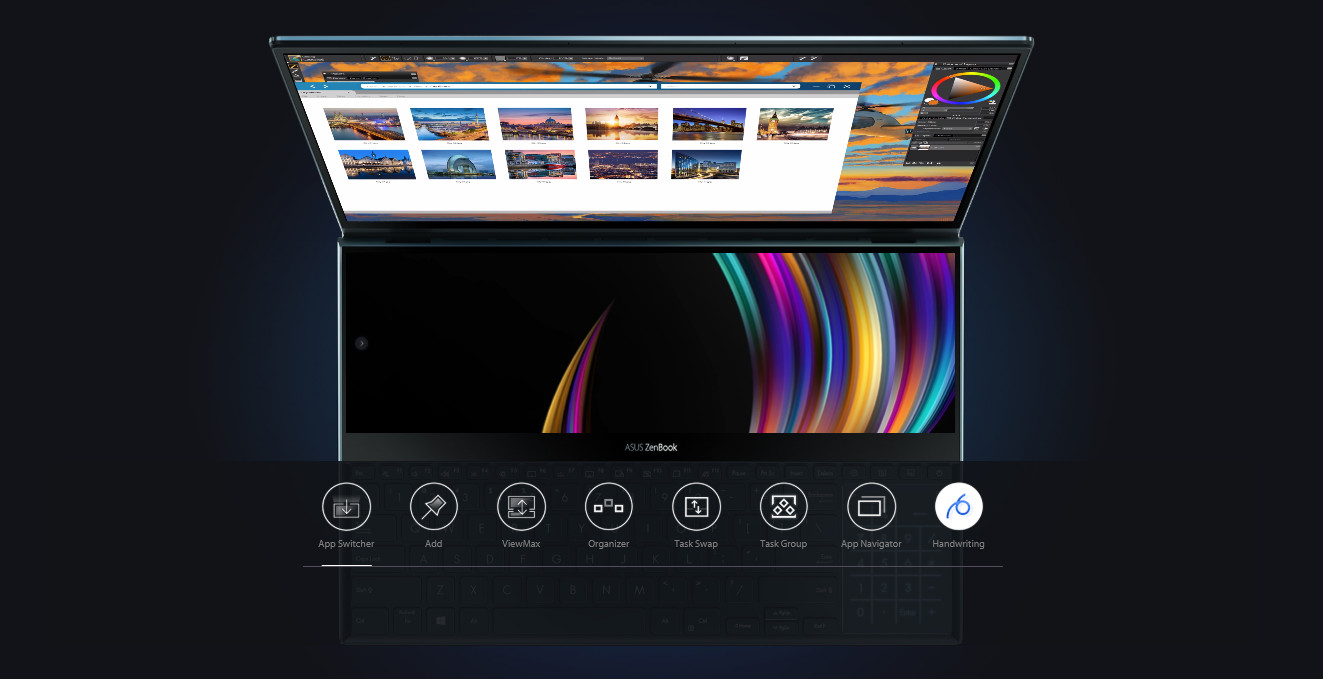
ASUS ScreenPad™ Plus gives you on-the-go computing like you’ve never experienced before. It’s a full-width 4K secondary touchscreen that works seamlessly with the main 15.6-inch 4K UHD OLED touchscreen, giving you endless ways to optimize and personalize your workflow. A series of handy built-in apps help boost your productivity. Quick Key allows one-tap automation of complex keyboard sequences, and Handwriting lets you input text intuitively. There are also useful quick controls such as App Switcher, ViewMax and Task Swap for intuitive interactions between the main display and ScreenPad Plus. Task Group lets you lock into work mode by opening multiple tasks with a single touch. And now you can drag apps or in-app toolbars onto ScreenPad Plus to give you more room to work on the main display, wherever you are.
Perfect ergonomics, for stylus or keyboard
With ZenBook Pro Duo and the bundled stylus — or your favorite active stylus — you can really let your creativity flow. Both multitouch displays support stylus input, but ScreenPad Plus gives you a superbly ergonomic and stable platform for writing or drawing. Take notes, sketch out your ideas, or do precision graphical editing in the most intuitive way ever. There’s also a separate palm rest in the box, which enhances the ErgoLift tilting keyboard design to give you the most comfortable typing experience ever.
Endless possibilities
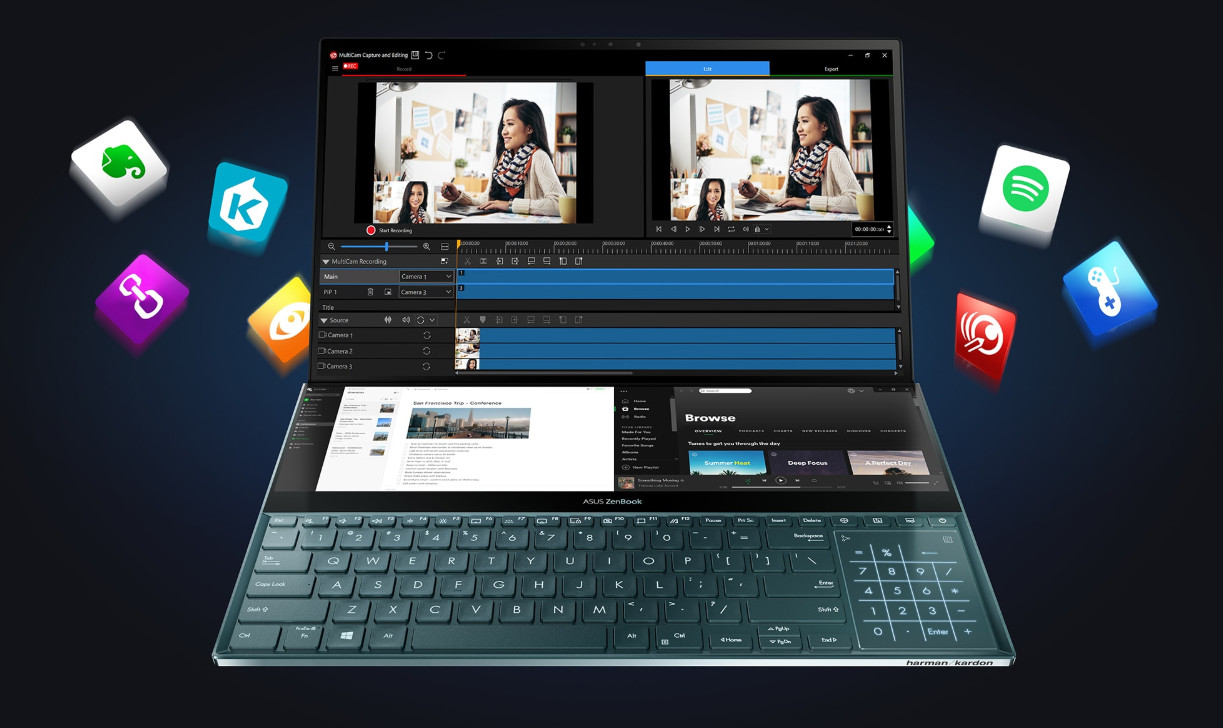
ScreenPad™ Plus gives you effortless app multitasking, so ASUS works closely with third-party developers — including professional video-editing software developer Corel®, with more to come — to optimize ScreenPad Plus for the ultimate productivity. ScreenPad Plus is your gateway to endless possibilities.
* Software depicted is Corel® MultiCam and Spotify®
Unrivaled portable power
ZenBook Pro Duo is powered by up to a 9th Generation Intel® Core™ i9 eight-core processor, the latest gaming-grade NVIDIA® GeForce RTX™ 2060 graphics and blisteringly fast storage. This ultrapowerful combination ensures that ZenBook Pro Duo takes professional-quality tasks in its stride, such as multi-layer photo or video editing, 3D graphics rendering or even game live-streaming.
Ultrapowerful computing
ZenBook Pro Duo is incredibly powerful, featuring up to a 9th Generation Intel® Core™ i9 eight-core processor that’s designed to deliver the ultimate multitasking performance. With its unprecedented 5GHz Turbo Boost frequency, ZenBook Pro Duo can effortlessly handle all the apps on your main screen and ScreenPad™ Plus, for the most fluid cross-screen workflow ever.
Professional-grade graphics
For the very best graphics experience, ZenBook Pro Duo uses the latest NVIDIA® GeForce RTX™ 2060 discrete graphics powered by the NVIDIA Turing™ architecture. The ultrapowerful GPU with the NVIDIA Studio Driver enables you to enjoy the power of real-time ray-tracing and high-resolution video editing for the ultimate visual realism. Advanced RTX features like hardware-accelerated ray tracing ensures stunning visuals, while exclusive AI assistance reduces repetitive tasks for faster content creation. With ZenBook Pro Duo, your creativity will know no bounds.
4K UHD OLED, ultraslim bezels
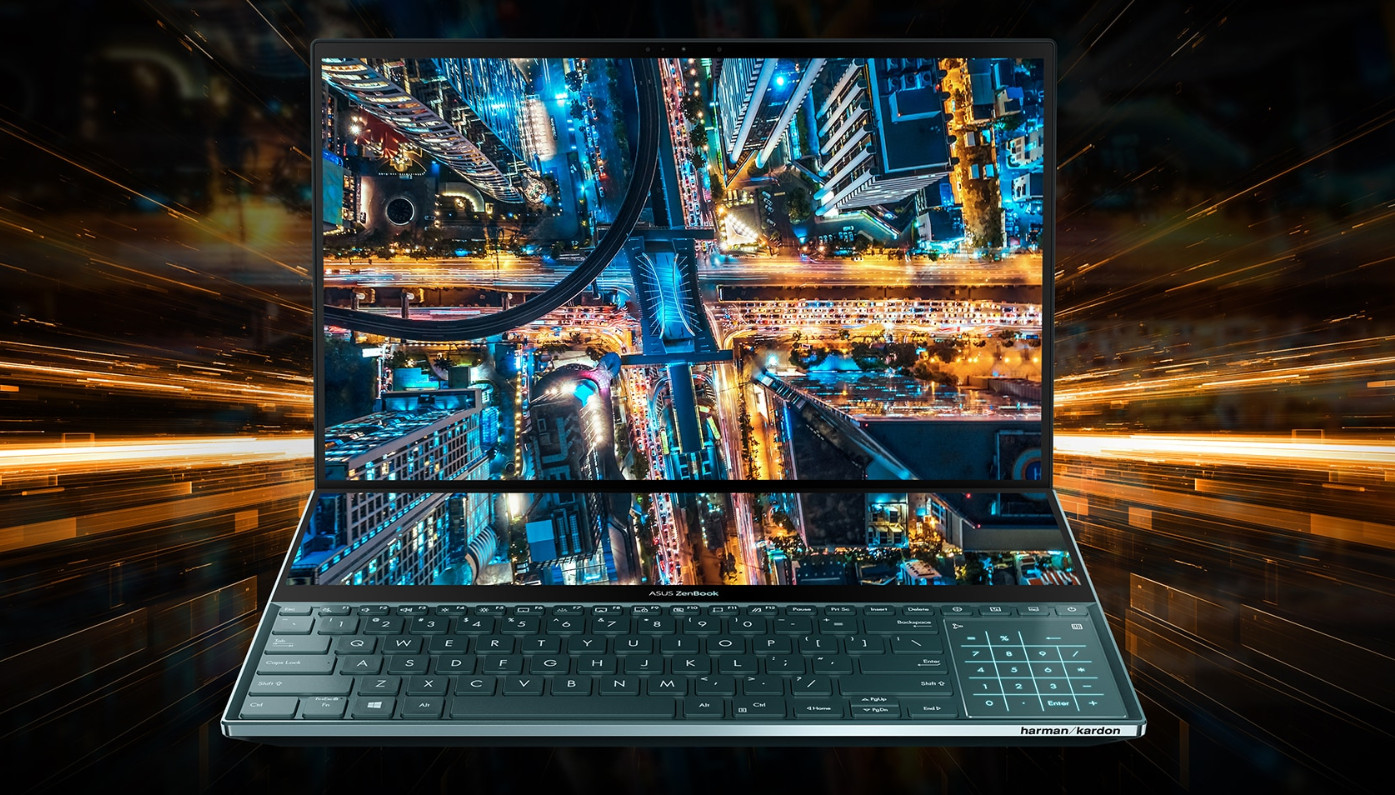
The 4K UHD NanoEdge OLED HDR display4 on ZenBook Pro Duo is truly amazing, with a four-sided frameless design featuring ultraslim bezels. The brilliant OLED touchscreen delivers ultra-vivid colors and deep blacks, with a cinema-grade 100% DCI-P3 color gamut making it a superb all-rounder for professional work and entertainment. The barely-there bezels increase the screen-to-body ratio to a near-borderless 89%, giving you more screen, and less distraction!
Extraordinary color
To display the most accurate, most vivid, and most realistic colors possible, ZenBook Pro Duo’s display has PANTONE® Validated color accuracy and supports an exceptionally wide 100% DCI-P3 color gamut. The DCI-P3 color space — widely used in the motion picture industry — is increasingly the preferred choice of creative professionals for its increased range of possible colors, and makes images on ZenBook Pro Duo look simply stunning.
Ultimate numeric keypad solution
ZenBook Pro Duo features the latest version of the ASUS NumberPad, an LED-illuminated numeric keypad integrated into the touchpad. Tap on the top-right NumberPad icon for one second to switch the function on and off, and tap on the top-left icon to choose one of two brightness levels. Even when the NumberPad is activated, the touchpad can be used for cursor control thanks to its intelligent software.
Hands-free login with face unlock
Enjoy hands-free login on your laptop, using the infrared camera with Windows Hello to login with just a glance — even in the dark!

Ultrafast connectivity
ZenBook Pro Duo is built for creative professionals, so there’s no compromise on connectivity. A full set of high-performance I/O ports — including the latest Thunderbolt™ 3 USB-C™ port — give you dongle-free connectivity whatever you’re doing, wherever you are. The latest Intel Wi-Fi 6 with Gig+ (802.11ax) takes wireless speeds to the next level, for supersmooth connections to the world.
Alexa built-in with light bar
Alexa5 makes it easy to voice control your day. At home or on the go you can ask Alexa to play music, read the news, answer questions and more. Your ZenBook Pro Duo has a dedicated light bar that illuminate when you speak to Alexa. Just ask, and Alexa will respond instantly.
Audio tuned by Harman Kardon
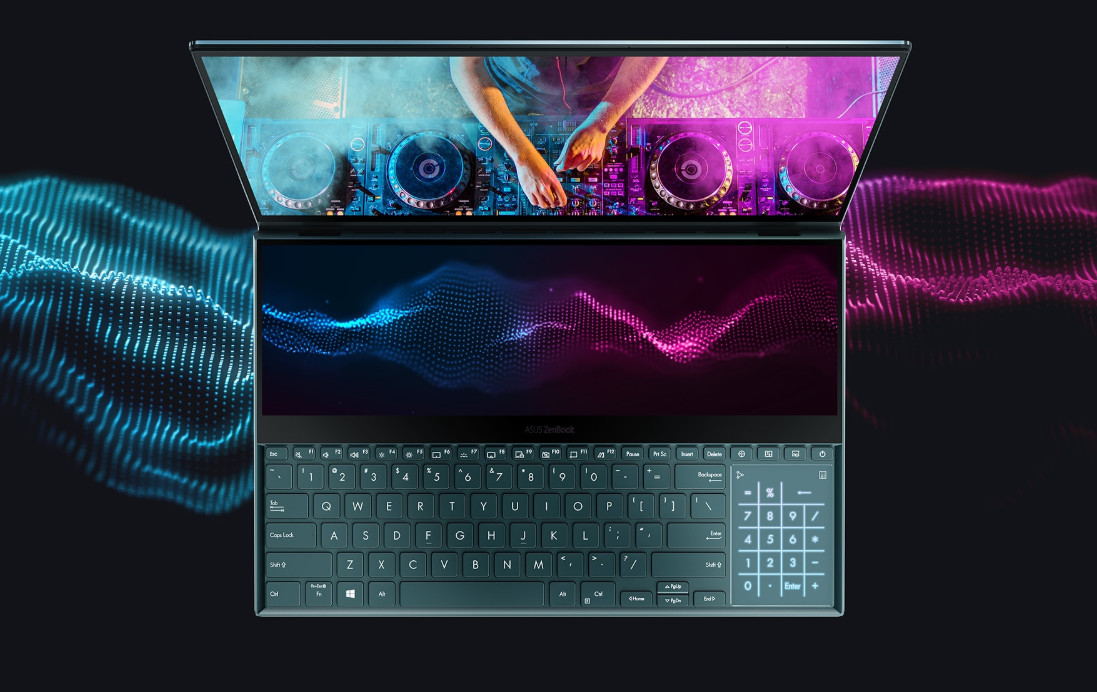
The ASUS Golden Ear team worked with renowned home and automotive audio experts Harman Kardon to ensure the best audio experience. A tailored mix of superior hardware — including smart amplifier technology that delivers louder sound with no distortion — and finely tuned software gives you sound like no other laptop.
Military-grade toughness and build quality
ZenBook Pro Duo meets the ultra-demanding MIL-STD 810G military standard for reliability and durability, undergoing a punishing test regime that includes extended tests for operation in harsh environments including extreme altitudes, temperatures and humidity. It has also passed ASUS internal laptop tests that far exceed the standards set by the industry.
1. Unless otherwise stated, all performance claims are based on theoretical performance. Actual figures may vary in real-world situations.
2. In PCMark 10 tests, ZenBook Pro Duo performed 1.43x faster than a rival laptop powered by an Intel® Core™ i9-8950HK processor.
3. As measured by SYSmark® 2014 SE – overall score comparing 9th Gen Intel® Core™ i9-9980HK vs. 8th Gen Intel® Core™ i9-8950HK.
4. With extended long-term use, OLED displays can show slight visual changes. This is also expected behavior and can include effects such as image persistence or burn-in, where the display shows a faint remnant of an image even after a new image appears on the screen. This can occur in more extreme cases such as when the same high contrast image is continuously displayed for prolonged periods of time. ASUS has engineered the OLED display to reduce the effects of OLED burn-in. High dynamic range (HDR) means that your display is able to playback HDR content. With ZenBook Pro Duo UX581, you can enjoy the following functions:
1. Watch HDR streaming videos
If the video supports HDR, UX581 will automatically prioritize the HDR version for playback for the best viewing experience. As the HDR streaming processing is not fully optimized in Google Chrome, we recommend using Microsoft Edge as your internet browser for the best visual experience.
2. Play HDR-capable games, media, and other apps
If you own HDR content and would like to view it in HDR on UX581, please first connect UX581 to the DC power supply. Open Display Settings, select Windows HD Color settings, then switch on Play HDR games and apps. When this function is turned on, the display's brightness may be reduced and you will need to readjust the brightness to the desired level. Also, the color of the Windows Desktop may change, but this won’t affect HDR functions. We recommend you only switch on Play HDR games and apps when you use related apps. For non-streaming HDR videos with HEVC decoder requirements, we also recommend using Microsoft’s built-in Movies & TV app.
5. Amazon Alexa availability varies according to country. Please check with your local ASUS retailer for details.
Take your creativity and productivity to the next level with the groundbreaking ASUS ZenBook Pro Duo! Designed to give you the ultimate edge in workflow efficiency, the powerful RTX Studio Laptop features a full-width 4K ASUS ScreenPad™ Plus that works seamlessly with the main 4K UHD OLED display. It’s never been this easy to harness your full creative power.
Reflect your personalized style
The brand new Celestial Blue color draws its inspiration from the future, and gives ZenBook Pro Duo a sophisticated air of timeless innovation. As befits such a revolutionary concept, it’s also decorated with a unique asymmetric version of the iconic Zen-inspired spun-metal finish: an intriguing design detail that gives ZenBook Pro Duo a totally unmistakable identity. The edges are finished with wide, mirror-finished diamond-cut edges that reflect your surroundings to add a subtle touch of ambient style: in effect, you’re in charge of your laptop’s design.
Experience ultimate productivity
ASUS ScreenPad™ Plus gives you on-the-go computing like you’ve never experienced before. It’s a full-width 4K secondary touchscreen that works seamlessly with the main 15.6-inch 4K UHD OLED touchscreen, giving you endless ways to optimize and personalize your workflow. A series of handy built-in apps help boost your productivity. Quick Key allows one-tap automation of complex keyboard sequences, and Handwriting lets you input text intuitively. There are also useful quick controls such as App Switcher, ViewMax and Task Swap for intuitive interactions between the main display and ScreenPad Plus. Task Group lets you lock into work mode by opening multiple tasks with a single touch. And now you can drag apps or in-app toolbars onto ScreenPad Plus to give you more room to work on the main display, wherever you are.
Perfect ergonomics, for stylus or keyboard
With ZenBook Pro Duo and the bundled stylus — or your favorite active stylus — you can really let your creativity flow. Both multitouch displays support stylus input, but ScreenPad Plus gives you a superbly ergonomic and stable platform for writing or drawing. Take notes, sketch out your ideas, or do precision graphical editing in the most intuitive way ever. There’s also a separate palm rest in the box, which enhances the ErgoLift tilting keyboard design to give you the most comfortable typing experience ever.
Endless possibilities
ScreenPad™ Plus gives you effortless app multitasking, so ASUS works closely with third-party developers — including professional video-editing software developer Corel®, with more to come — to optimize ScreenPad Plus for the ultimate productivity. ScreenPad Plus is your gateway to endless possibilities.
* Software depicted is Corel® MultiCam and Spotify®
Unrivaled portable power
ZenBook Pro Duo is powered by up to a 9th Generation Intel® Core™ i9 eight-core processor, the latest gaming-grade NVIDIA® GeForce RTX™ 2060 graphics and blisteringly fast storage. This ultrapowerful combination ensures that ZenBook Pro Duo takes professional-quality tasks in its stride, such as multi-layer photo or video editing, 3D graphics rendering or even game live-streaming.
Ultrapowerful computing
ZenBook Pro Duo is incredibly powerful, featuring up to a 9th Generation Intel® Core™ i9 eight-core processor that’s designed to deliver the ultimate multitasking performance. With its unprecedented 5GHz Turbo Boost frequency, ZenBook Pro Duo can effortlessly handle all the apps on your main screen and ScreenPad™ Plus, for the most fluid cross-screen workflow ever.
Professional-grade graphics
For the very best graphics experience, ZenBook Pro Duo uses the latest NVIDIA® GeForce RTX™ 2060 discrete graphics powered by the NVIDIA Turing™ architecture. The ultrapowerful GPU with the NVIDIA Studio Driver enables you to enjoy the power of real-time ray-tracing and high-resolution video editing for the ultimate visual realism. Advanced RTX features like hardware-accelerated ray tracing ensures stunning visuals, while exclusive AI assistance reduces repetitive tasks for faster content creation. With ZenBook Pro Duo, your creativity will know no bounds.
4K UHD OLED, ultraslim bezels
The 4K UHD NanoEdge OLED HDR display4 on ZenBook Pro Duo is truly amazing, with a four-sided frameless design featuring ultraslim bezels. The brilliant OLED touchscreen delivers ultra-vivid colors and deep blacks, with a cinema-grade 100% DCI-P3 color gamut making it a superb all-rounder for professional work and entertainment. The barely-there bezels increase the screen-to-body ratio to a near-borderless 89%, giving you more screen, and less distraction!
Extraordinary color
To display the most accurate, most vivid, and most realistic colors possible, ZenBook Pro Duo’s display has PANTONE® Validated color accuracy and supports an exceptionally wide 100% DCI-P3 color gamut. The DCI-P3 color space — widely used in the motion picture industry — is increasingly the preferred choice of creative professionals for its increased range of possible colors, and makes images on ZenBook Pro Duo look simply stunning.
Ultimate numeric keypad solution
ZenBook Pro Duo features the latest version of the ASUS NumberPad, an LED-illuminated numeric keypad integrated into the touchpad. Tap on the top-right NumberPad icon for one second to switch the function on and off, and tap on the top-left icon to choose one of two brightness levels. Even when the NumberPad is activated, the touchpad can be used for cursor control thanks to its intelligent software.
Hands-free login with face unlock
Enjoy hands-free login on your laptop, using the infrared camera with Windows Hello to login with just a glance — even in the dark!
Ultrafast connectivity
ZenBook Pro Duo is built for creative professionals, so there’s no compromise on connectivity. A full set of high-performance I/O ports — including the latest Thunderbolt™ 3 USB-C™ port — give you dongle-free connectivity whatever you’re doing, wherever you are. The latest Intel Wi-Fi 6 with Gig+ (802.11ax) takes wireless speeds to the next level, for supersmooth connections to the world.
Alexa built-in with light bar
Alexa5 makes it easy to voice control your day. At home or on the go you can ask Alexa to play music, read the news, answer questions and more. Your ZenBook Pro Duo has a dedicated light bar that illuminate when you speak to Alexa. Just ask, and Alexa will respond instantly.
Audio tuned by Harman Kardon
The ASUS Golden Ear team worked with renowned home and automotive audio experts Harman Kardon to ensure the best audio experience. A tailored mix of superior hardware — including smart amplifier technology that delivers louder sound with no distortion — and finely tuned software gives you sound like no other laptop.
Military-grade toughness and build quality
ZenBook Pro Duo meets the ultra-demanding MIL-STD 810G military standard for reliability and durability, undergoing a punishing test regime that includes extended tests for operation in harsh environments including extreme altitudes, temperatures and humidity. It has also passed ASUS internal laptop tests that far exceed the standards set by the industry.
1. Unless otherwise stated, all performance claims are based on theoretical performance. Actual figures may vary in real-world situations.
2. In PCMark 10 tests, ZenBook Pro Duo performed 1.43x faster than a rival laptop powered by an Intel® Core™ i9-8950HK processor.
3. As measured by SYSmark® 2014 SE – overall score comparing 9th Gen Intel® Core™ i9-9980HK vs. 8th Gen Intel® Core™ i9-8950HK.
4. With extended long-term use, OLED displays can show slight visual changes. This is also expected behavior and can include effects such as image persistence or burn-in, where the display shows a faint remnant of an image even after a new image appears on the screen. This can occur in more extreme cases such as when the same high contrast image is continuously displayed for prolonged periods of time. ASUS has engineered the OLED display to reduce the effects of OLED burn-in. High dynamic range (HDR) means that your display is able to playback HDR content. With ZenBook Pro Duo UX581, you can enjoy the following functions:
1. Watch HDR streaming videos
If the video supports HDR, UX581 will automatically prioritize the HDR version for playback for the best viewing experience. As the HDR streaming processing is not fully optimized in Google Chrome, we recommend using Microsoft Edge as your internet browser for the best visual experience.
2. Play HDR-capable games, media, and other apps
If you own HDR content and would like to view it in HDR on UX581, please first connect UX581 to the DC power supply. Open Display Settings, select Windows HD Color settings, then switch on Play HDR games and apps. When this function is turned on, the display's brightness may be reduced and you will need to readjust the brightness to the desired level. Also, the color of the Windows Desktop may change, but this won’t affect HDR functions. We recommend you only switch on Play HDR games and apps when you use related apps. For non-streaming HDR videos with HEVC decoder requirements, we also recommend using Microsoft’s built-in Movies & TV app.
5. Amazon Alexa availability varies according to country. Please check with your local ASUS retailer for details.
Часто покупают вместе


0€ в пакомат

Автоматическая кофемашина DeLonghi Magnifica Evo ECAM290.81.TB, черный цв.
399,00 €
Обычная цена
519,00 €
0€ в пакомат

ТОП товар
ТОП товар
0€ в пакомат
ТОП товар

ТОП товар
0€ в пакомат