Информация о товаре
Часто покупают вместе
Повреждённая упаковка
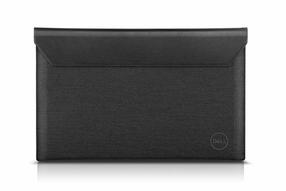
Товар с повреждённой упаковкой. Чехол для ноутбука Dell, черный цв./серый цв., 14″
39,90 €
Обычная цена
63,90 €
ТОП товар
0€ в пакомат


0€ в пакомат


Поврежденная упаковка
Поврежденная упаковка
Товары с поврежденной упаковкой - это новые и неиспользованные товары, которые были вскрыты или упаковка была повреждена иным образом.
Тип продукта
Бренд
Модель
P2725HE
Цвет
Серебристый цв., Черный цв.
Материал корпуса
Пластик
Разрешение дисплея
1920 x 1080
Тип экрана
IPS
Класс энергоэффективности
D
Шкала классов энергоэффективности
A - G
Hапряжение
100 - 240 В
Диагональ экрана
27 ″
Тип яркости экрана
FHD
Частота экрана
100 гц
Форма экрана
Плоский
Функция 3D
Нет
Число разъемов USB 3.x
3
Число разъемов HDMI
1
Ширина
53.78 см
Высота
49.61 см
Глубина
17.9 см
Стандарт VESA
100 x 100
nVidia G-Sync
Нет
AMD FreeSync
Нет
Тип портов
2 x DisplayPort, 2 x USB-C , 3 x USB 3.2, HDMI, RJ-45
Доступна функция дистанционного управления
Нет
Тип монитора
LED мониторы
Тип поверхности экрана
Фактура: матовая
Время реакции
8 ms
Контрастность
1500 : 1
Горизонтальный угол наблюдения
178 град
Яркость, cd/м²
300
Вертикальный угол наблюдения
178 град
Сенсорный экран
Нет
Функция TV
Нет
Встроенные динамики
Нет
Регулируется
Высота, Наклон, Поворот
Подходит для монтажа к стене
Да
Вес
3.81 кг
Право предъявления претензии для физических лиц
24 месяц
Право предъявления претензии для юридических лиц
12 месяц
Заметил ошибку в описании товара, в таблице характеристик или в галерее фотографий? Сообщи нам об этом
Цвет товара может отличаться от того, что видно на фотографии.
Don't slow down wherever you work. Reduce harmful blue light with this slim 23.8" FHD monitor with hub and ComfortView Plus.
1. Security lock slot | 2. Power connector | 3. HDMI port | 4. Base lock | 5. DisplayPort (input) | 6. DisplayPort (output) | 7. Upstream USB Type-C port | 8. Super-fast 5Gb/s downstream USB port (4) | 9. RJ45 port

Повреждённая упаковка
Товар с повреждённой упаковкой. Чехол для ноутбука Dell, черный цв./серый цв., 14″
Обычная цена

ТОП товар

0€ в пакомат
0€ в пакомат
Предложения

Бытовая техника

Для кухни - малая бытовая техника
Вафельницы
Мультиварки и принадлежности
Блинницы
Пароварки
Бутербродницы
Блендеры
Электрические чайники
Тостеры
Соковыжималки
Кухонные комбайны
Микроволновые печи
Электрические настольные грили
Аэрогрили, фритюрницы
Мини-печи
Кухонные весы
Хлебопечки
Измельчители для овощей, электрические терки и ножи
Миксеры
Сушилки для фруктов и дегидраторы
Мясорубки
Мини-плиты
Измельчители
Другая кухонная техника и аксессуары

Устройства для красоты и ухода за телом
Принадлежности для электробритв
Ирригаторы
Уход за лицом
Триммеры для бороды, электробритвы
Массажеры
Приборы по уходу за телом
Приборы для ухода за волосами
Электрические зубные щетки и принадлежности
Весы
Измерители артериального давления и принадлежности
Ингаляторы
Греющие одеяла и другие обогреватели для тела
Глюкометры
Пульсоксиметры
Термометры для тела
Лампы для светотерапии

Техника климат-контроля
Конвекционные радиаторы
Газовые обогреватели
Масляные радиаторы
Инфракрасные обогреватели
Электрические обогреватели
Тепловые вентиляторы
Осушители воздуха, влагопоглотители
Метеорологические станции
Термометры для воздуха
Увлажнители воздуха
Очистители воздуха и принадлежности
Ароматические диффузоры
Кондиционеры
Вентиляторы

Кофейные аппараты, кофе, принадлежности
Автоматические кофемашины
Полуавтоматические кофемашины
Капсульные кофейные аппараты
Кофейные аппараты с капельным фильтром, комбинированные кофейные аппараты
Кофемолки
Принадлежности для кофейных аппаратов
Кофе, кофейные капсулы и зерна
Вспениватели молока
Эспрессо-машины
Кофейные аппараты Jura
Портативные кофемашины

Встраиваемая бытовая техника
Встраиваемые духовки
Встраиваемые плиточные поверхности
Встраиваемые посудомоечные машины
Встраиваемые холодильники и морозильники
Встраиваемые вытяжки
Встраиваемые стиральные машины
Встраиваемые микроволновые печи
Встраиваемые кофейные аппараты
Телескопические направляющие для духовок
Измельчители пищевых отходов

Крупная бытовая техника

Для дома - малая бытовая техника

Интерьер, мебель и текстиль

Принадлежности для ванной комнаты
Стаканы и держатели
Дозаторы для жидкого мыла
Держатели зубных щеток
Мыльницы
Держатели бумажных полотенец
Подлокотники, сиденья для душа и ванны
Сушилки для рук
Держатели для туалетной бумаги
Ершики для унитаза
Крючки для ванной
Полки для ванной комнаты
Мусорники для ванной комнаты
Корзины для белья
Держатели полотенец для ванной комнаты
Полотенцесушители
Подносы для ванной
Шторы для ванны и душа

Предметы интерьера
Декоративные подушки и наволочки
Искусственные цветы, растения
Подарочные пакеты и упаковочная бумага
Предметы интерьера
Ширмы
Шкатулки для ювелирных изделий
Часы
Фоторамки и альбомы
Картины
Клейкие пленки
Вазы
Свечи
Подсвечники
Декоративные подносы и коврики для стола
Ароматизаторы для дома, аромапалочки
Чехлы для стульев

Мебельная фурнитура

Домашний текстиль

Мебель

Ковры и меха

Шторы, жалюзи, занавески

Рождественские украшения и декорации

Карнизы, рельсы и их принадлежности

ТВ, аудио, видео, игровые приставки

Игровые консоли и принадлежности
Игровые приставки
Джойстики
Компьютерные игры
VR очки
Аксессуары для игровых приставок
Игровые мыши
Игровые клавиатуры
Игровые рули и гоночные симуляторы
Игровые кресла
Игровые наушники
Одежда и сувениры для геймеров
Игровые ноутбуки
Игровые компьютеры
Игровые мониторы
Зарядные станции, зарядные устройства, адаптеры
Игровые коврики для компьютерных мышей
Защитные коврики для пола

Звуковое оборудование

Фотооборудование, видеотехника и оптика

Телевизоры и принадлежности

Игрушки, товары для детей

LEGO®
LEGO® Education
LEGO® City
LEGO® Classic
LEGO® Creator
LEGO® Disney Princess
LEGO® Duplo
LEGO® Friends
LEGO® Mindstorms
LEGO® Ninjago
LEGO® Star Wars
LEGO® Super Heroes
LEGO® Technic
LEGO® Super Mario
LEGO® Minecraft
LEGO® Architecture
LEGO® Harry Potter
LEGO® Jurassic World
LEGO® Ideas
LEGO® Speed Champions
LEGO® для взрослых
LEGO® Super Heroes DC
LEGO® Super Heroes Marvel
Для детей от 1,5 до 4 лет
Для детей от 4 до 6 лет
Для детей от 6 до 9 лет
Для детей от 9 до 12 лет
Для детей от 12 лет
LEGO® Frozen
LEGO® Batman
LEGO® Disney
LEGO® Avatar
LEGO® Art
LEGO® Icons
LEGO® DREAMZzz

Игрушки для детей
Игрушечные фигурки, супергерои
Игрушечные кубики
Конструкторы
Палатки для детей
Творческие игрушки
Музыкальные игрушки, инструменты
Мягкие игрушки
Игрушки для мальчиков
Игрушки для малышей
Игрушки для девочек
Ящики и сумки для игрушек
Развивающие игрушки
Сюжетно-ролевые игрушки
Механические игрушки
Радиоуправляемые игрушки
Игрушечное оружие и принадлежности
Игрушечные транспортные средства и трассы
Интерактивные игрушки
Роботы
Деревянные игрушки
Водные игрушки
Пазлы
Настольные игры
Куклы, кукольные домики
Игрушки красоты

Товары для детей и младенцев
Игрушки для сна
Принадлежности для автокресел
Детские кресла-качалки
Товары для безопасности детей
Подгузники и влажные салфетки
Горшки, сиденья для унитазов и подставки
Детские переноски
Бутылочки, пустышки
Для купания и ухода
Для сна
Устройства наблюдения за детьми
Детские развивающие коврики
Стульчики для кормления
Детские коляски
Наушники с функцией шумоподавления
Пеленальные столики
Ходунки для детей
Автокресла для детей
Посуда и аксессуары для кормления

Канцелярские принадлежности для школы
Рюкзаки, сумки для школы
Детские спортивные сумки
Папки, обложки и органайзеры для документов
Коробки для документов и карандашей
Ластики и точилки
Клеи
Тетради и блокноты
Карандаши, фломастеры и маркеры
Художественные принадлежности
Мелки для рисования
Пластилин, принадлежности для лепки
Пеналы
Карты, открытки и календари
Письменные принадлежности
Линейки и транспортиры
Циркули

Игрушки для улицы, детские площадки
Детские спортивные игрушки и игры
Мыльные пузыри, генераторы мыльных пузырей
Детские машинки, мотоциклы и самокаты
Зимние игрушки и санки для детей
Воздушные змеи
Детские электромобили и мотоциклы
Бумеранги, летающие тарелки
Игрушки для песочницы
Детские самокаты
Песочницы
Качели для детей
Водные игрушки
Ветряные мельницы, сачки для бабочек
Детские домики
Детские горки и игровые площадки

Кормление и товары для мам
Посуда и аксессуары для кормления
Молокоотсосы
Детские бутылочки
Стерилизаторы для бутылочек
Бельё для беременных и кормящих мамочек
Принадлежности для стульев кормления
Контейнеры для молока и принадлежности
Стульчики для кормления
Подогреватели для бутылочек
Подушки для кормления
Приборы для приготовления детского питания
Соски
Детские слюнявчики

Рюкзаки, спортивные сумки, кошельки

Аксессуары для детского праздника

Детская одежда, обувь и аксессуары

Игровые столы

Настольные игры

Пазлы

Адвент-календари для детей

Авто и мото товары

Принадлежности для автомобилей
Автоинверторы и электротовары
Топливные баки, воронки
Топливные шланги и принадлежности
Антенны для автомобилей
Наконечники на рычаг переключения скоростей
Тонировочные плёнки
Автомобильные и другие чехлы
Держатели номера автомобиля
Держатели для телефонов
Чехлы для автомобильных кресел
Автомобильные холодильники
Чехлы на руль
Другие автомобильные аксессуары и принадлежности

Моторные масла и смазки
Моторные масла
Масла для мотоциклов
Трансмиссионные масла
Масла для грузовых автомобилей
Тормозные жидкости
Жидкости для гидроусилителя руля
Присадки для бензина
Минеральные масла
Полусинтетические масла
Синтетические масла
Тормозные жидкости, жидкости для гидроусилителя руля, трансмиссионные масла
Присадки для дизельного топлива

Чистящие средства для автомобилей

Средства по уходу за автомобилем

Аварийные наборы для автомобиля

Автомобильное аудио- и видеооборудование

Резина

Транспортировочное и грузоподъемное оборудование

Мототовары

Автомобильные лампочки

Полироли для автомобилей

Аккумуляторы и зарядные устройства

Колпаки на колеса и принадлежности

Автомобильные коврики

Стеклоомывающие жидкости

Автомобильные компрессоры, насосы

Станции для зарядки электромобилей, кабели и принадлежности

Стартеры, пусковые провода, клеммы

Мойки высокого давления и принадлежности

Автохимия

Освежители воздуха для автомобилей

Автомобильные аптечки

Алкотестеры

Дворники

Охлаждающие жидкости

Автокресла для детей

Автомобильные инструменты

Парковочные системы

Инструменты

Электроинструменты и принадлежности
Электрические дрели и принадлежности
Электрические шлифмашинки и принадлежности
Электрические режущие инструменты и принадлежности
Паяльные инструменты и материалы
Электрические фрезеры и принадлежности
Электрические инструменты и принадлежности для строгания
Электрические перфораторы и отбойные молотки
Электрические строительные фены
Точильно-шлифовальные станки
Электрические инструменты и принадлежности для гравировки
Электрические инструменты и принадлежности для покраски
Электрические многофункц. инструменты и аксессуары
Электрические инструменты и принадлежности для шлифовки
Клеевые пистолеты и принадлежности
Электрические плиткорезы
Принадлежности и запасные детали для электроинструментов
Электрические степлеры и принадлежности
Электрические строительные смесители и принадлежности

Ручные инструменты и принадлежности
Инструменты для фиксации, клёпки
Инструменты для завинчивания
Режущие инструменты
Инструменты для забивания гвоздей, скобирования
Измерительные приборы и устройства
Шлифовальные инструменты
Плоскогубцы и их комплекты
Комплекты ручных инструментов
Рубанки, шила, пинцеты
Инструменты для труб, отвертки, плоскогубцы
Верстаки
Насадки для дрелей

Аккумуляторные инструменты и принадлежности

Сварочное оборудование, материалы и принадлежности

Ящики для инструментов, футляры, ремни

Инструменты для покраски и отделки, принадлежности

Пневматические инструменты, оборудование и принадлежности

Лестницы и подъемные устройства

Бетономешалки, машины для прессования

Абразивные материалы

Тележки для транспортировки и принадлежности

Строительные пылесосы и принадлежности

Мойки высокого давления и принадлежности

Принадлежности для аккумуляторов и электроинструментов

Генераторы

Зоотовары

Для кошек
Корм для кошек
Лотки и принадлежности для кошачьих туалетов
Лакомства для кошек
Витамины и добавки для кошек
Миски и поилки для кошек
Наполнители для кошачьего туалета
Поводки, ошейники и шлейки для кошек
Игрушки для кошек
Когтеточки
Домики и лежанки для кошек
Средства гигиены для кошек
Сумки и переноски для кошек

Для собак
Корм для собак
Лакомства для собак
Пищевые добавки и витамины для собак
Ошейники, шлейки, поводки и намордники для собак
Миски для кормов и контейнеры для хранения
Сумки, переноски и корзинки для собак
Лежанки для собак
Будки и клетки для собак
Игрушки для собак
Одежда и аксессуары для собак
Средства гигиены для собак

Для птиц

Для рыбок

Для грызунов

Для рептилий

Другие товары для домашних животных

Телефоны, умные часы, товары Apple

Мобильные телефоны

Магазин Apple

Аксессуары для мобильных телефонов
Чехлы и футляры для телефонов
Защитные пленки экрана
Карты памяти для телефонов
Беспроводная гарнитура
Зарядные устройства, адаптеры, провода для телефонов
Зарядные устройства - аккумуляторы (Power Banks)
Телефонные батареи, аккумуляторы
Автомобильные держатели для телефонов
Запасные детали для мобильных телефонов
Другие аксессуары для мобильных телефонов
Держатели и подставки для телефонов

Планшеты, электронные книги и аксессуары

Умные часы и браслеты

Стационарные телефоны

Рации

Смарт кольца

Подарки, товары для праздников

Сантехника и отопление

Устройства для отопления, топливо, обогреватели

Водяные насосы и гидрофоры

Смесители, краны и принадлежности

Системы сбора и отвода сточных вод

Системы водоснабжения
Пластиковые системы подачи горячей воды
Приборы для измерения давления
Медные системы водоснабжения
Системы водоснабжения высокого давления
Пластиковые алюминиевые многослойные системы водоснабжения
Системы водоснабжения высокого давления PE/PP
Детали фитингов для стальных труб
Клеющиеся пластмассовые системы водоснабжения

Душевые кабины, стенки и другое оборудование

Вентиляционные приборы

Ванны и аксессуары

Раковины и принадлежности

Унитазы, биде, писсуары и принадлежности

Средства для фильтрации воды

Сантехнические соединения, клапаны

Кухонные раковины и принадлежности

Полотенцесушители, сушилки для рук

Счетчики воды

Освещение

Компьютерная техника, товары для офиса

Офисные принадлежности и канцелярские товары
Калькуляторы
Сейфы
Ящики для хранения денег
Чистящие средства для компьютерной техники
Стикеры, бумага для заметок
Подставки под запястье
Доски и аксессуары
Подставки для ног
Канцелярские товары
Блокноты, тетради и дневники
Циркули
Бумага, офисная бумага
Ежедневники
Корректоры
Обложки и папки для документов
Ручки и чернила
Маркеры
Линейки и транспортиры
Ножницы
Клей
Флаги, флагштоки
Акриловый фетр
Органайзеры для канцелярии
Органайзеры для документов
Карандаши

Игровое оборудование

Принтеры

Периферийные устройства и аксессуары

Компьютерные компоненты, сетевые продукты

Ноутбуки и другие товары

Стационарные компьютеры, мониторы, UPS

Тонеры, картриджи и другие расходные материалы для принтеров

Оборудование для постобработки

Планшеты, электронные книги и аксессуары

Проекторы и принадлежности для презентаций

Программное обеспечение

Детекторы валют и счетчики банкнот

Адаптеры, кабели и провода

Сканеры

Ламинаторы

VR очки

Игровые консоли и принадлежности

Хозяйственные товары

Кухонные принадлежности
Кухонные принадлежности, текстиль
Пищевые термометры
Фильтры и картриджи для питьевой воды
Сковороды и принадлежности
Бумага для выпечки, фольга, пленка
Комплектующие для вакуумных упаковочных машин
Кастрюли и крышки
Ножи, кухонные ножницы и доски
Посуда и принадлежности для сервировки стола
Посуда для приготовления еды и принадлежности
Посуда и контейнеры для хранения продуктов

Бытовая химия

Для ресторанов и баров

Принадлежности для уборки дома

Горелки

Ароматизаторы для дома, освежители воздуха

Парфюмерия, косметика, средства гигиены и аксессуары

Декоративная косметика
Средства для губ
Косметика для глаз
Средства для ногтей
Румяна
Кисти, спонжи и принадлежности для макияжа
Пудры
Комплекты декоративной косметики
Маскирующие средства
Консилеры
Базы для макияжа
Фиксаторы макияжа
Косметички и чемоданы для косметики
Контуринг и скульпторы
Косметические аксессуары
Косметические зеркала

Парфюмерия

Для личной гигиены

Косметика для лица

Для ухода за волосами

Косметика для мужчин

Косметика для тела

Для маникюра и педикюра

Косметика для детей

Корейская косметика

Отделочные материалы

Клеи, материалы для подготовки поверхности
Клеи для обоев
Клеи для полов и стен
Монтажные и конструкционные клеи
Клеи ПВА
Специальные клеи
Строительные клеи
Малярные клейкие ленты и пленки
Другие клейкие ленты
Декоративная штукатурка
Клеи для плитки
Клеи для пробковых покрытий
Клеи для потолочных покрытий
Клей-момент
Средства по уходу за поверхностями
Средства для очистки поверхностей
Строительные чистящие средства, пропитки

Напольные покрытия и половые доски
Ламинат
Резиновые напольные покрытия
Паркет и паркетные доски
Пробковые напольные покрытия
Плинтусы
Пробковые покрытия, подложки
Линолеум
Ковровые покрытия
Деревянные доски и панели
Плитка, доски и принадлежности для террас
Пластиковые напольные покрытия
Виниловые напольные покрытия
Гибридные напольные покрытия

Обои и принадлежности

Плитка

Лаки

Краски, лакокрасочные добавки

Отделочные доски, панели

Планки, стыки, уголки

Шпатлевки, грунтовки

Потолок

Пропитки и антисептики для дерева

Строительные материалы

Теплоизоляционные материалы

Электроматериалы
Тепловые трубки
Электрические провода и кабели
Электрические выключатели и розетки
Датчики движения и сумерек
Распределительные щиты и боксы
Сенсоры и детекторы дыма
Удлинители, их детали и разделители
Монтажные трубы, коробки, кабельные каналы и другое
Электронные трансформаторы
Батарейки и зарядные устройства
Электроиндикаторы и тестеры
Солнечные панели и принадлежности
Изоляционные ленты
Инспекционные двери и люки

Кровельные покрытия
Битумная кровля, рубероид
Поликарбонатные листы
Ленты для конька и кровельные листы
Системы отвода дождевой воды
Битумная черепица
Панели ПВХ
Безасбестовый шифер
Битумные волнистые листы
Металлическая кровля
Металлические ветровые доски
Навесы из поликарбоната
Металлические ленты для кровли, флюгеры
Сборочные детали для крыши

Сухие строительные смеси

Крепления

Дверные замки

Изделия из металла, пластика, трубы

Строительные панели

Кирпичи, булыжники, строительные блоки и другое

Двери, створки и коробки

Cтроительная древесина

Герметики, монтажная пена, силиконы

Строительные пленки, ткани, сетки

Гидроизоляционные материалы

Клей

Рабочая одежда и товары безопасности труда

Окна и принадлежности

Лестницы и принадлежности

Гипсокартон, профили и принадлежности

Товары для сада

Садовые инструменты
Косы, серпы, кирки и ножи
Топоры и их принадлежности
Грабли
Мётлы и щётки для улицы
Маленькие садовые инструменты
Рукоятки для садовых инструментов
Инструменты для уборки снега
Стремянки и подмости
Тачки и их принадлежности
Cадовые ножницы
Детские садовые инструменты
Земляные буры, сеялки для газона и катки для газона
Лопаты
Лопаты-совки
Плодосборники
Вилы

Садовая мебель

Садовая техника
Измельчители веток
Цепные пилы и принадлежности
Уличные подметатели
Дровоколы
Воздуходувки и принадлежности
Газонокосилки и их принадлежности
Аэраторы и скарификаторы
Триммеры, кусторезы и принадлежности
Ножницы для живой изгороди, кусторезы и принадлежности
Масла для садового оборудования
Культиваторы и принадлежности
Садовые тракторы и принадлежности

Системы орошения

Принадлежности для сада

Заборы, сетки, ворота

Торф, удобрения, семена

Цветочные горшки и другие товары для флористики

Средства для борьбы с вредителями

Для домашнего садоводства

Теплицы и их принадлежности

Мойки высокого давления и принадлежности

Тачки для сада и принадлежности

Декоративные камни и мульча

Складские стеллажи

Садовые сараи

Спорт, отдых, туризм

Спортивные товары и аксессуары
Альпинистское снаряжение
Боевое искусство
Насосы и иглы для мячей
Флорбол
Футбол
Палки и аксессуары для скандинавской ходьбы
Бильярд
Бейсбол
Бадминтон
Баскетбол
Уличные и спортивные игры
Спортивные бутылки и бутылки для воды
Сквош
Дартс
Спортивная одежда
Настольный теннис
Теннис
Волейбол
Шагомеры, секундомеры
Гандбол
Другой спортивный инвентарь
Падел-теннис
Диск-гольф
Пищевые добавки
Новус
Стрельба из лука

Товары для путешествий, рыбалки
Туристические плиты и принадлежности
Другие товары для путешествий и принадлежности
Рыболовные товары
Котлы, столовые приборы
Надувные матрасы и подушки для путешествий
Переносные биотуалеты и средства по уходу
Противомоскитные сетки
Туристические коврики
Покрывала для пикника
Сумки-холодильники
Компасы
Факелы, масляные лампы, керосин
Туристические сумки, рюкзаки, чемоданы
Туристические ножи, мультитулы
Спальные мешки
Палатки, навесы и принадлежности
Пляжные зонтики и принадлежности
Туристическая мебель
Туристические GPS-навигаторы и другие технические устройства
Походные фильтры для воды
Туристические гигиенические принадлежности
Телескопы
Бинокли
Монокли

Товары для гимнастики, йоги, пилатеса
Различные гимнастические товары
Гимнастические и массажные обручи
Гимнастические мячи
Гимнастические и коврики для йоги
Канаты, гимнастические стенки
TRX, тренировочные системы с подвеской
Турники для подтягивания
Скакалки
Набивные мячи
Резинки для фитнеса
Массажные шары
Массажные ролики и массажеры
Эспандеры
Блоки для йоги
Конусы, барьеры, лестницы ловкости
Балансировочные подушки
Балансировочные доски

Велосипеды и принадлежности

Тренажеры, утяжелители и товары для фитнеса
Беговые дорожки
Многофункциональные тренажеры
Эллиптические тренажеры
Тренажёры для гребли
Степперы
Пояса для тяжелой атлетики, перчатки
Гантели, гири, грифы, штанги, диски и блины
Велотренажеры
Напольные покрытия для тренажеров
Скамьи для тренировок
Аксессуары для гимнастического снаряжения
Ручные гироскопы
Тренажеры для пресса
Спортивные батуты

Плавание, дайвинг

Грили, коптильни и принадлежности

Зимние спортивные товары

Бассейны и принадлежности

Надувные аттракционы, матрасы, бассейны

Товары для здоровья, реабилитации и ухода

Электромопеды, мотоциклы, квадроциклы

Лодки, SUP доски и аксессуары

Самокаты, скейтборды, роликовые коньки и другое

Батуты и принадлежности

Гамаки, садовые качели

Дроны и принадлежности

Самокаты и аксессуары

Детские горки и игровые площадки

Мячи

Одежда и обувь

Аутлет

Товары с поврежденной упаковкой
Электронные товары и принадлежности с поврежденной упаковкой
Товары для детей и домашних животных с поврежденной упаковкой
Товары для спорта и отдыха с поврежденной упаковкой
Товары для дома с поврежденной упаковкой
Бытовая техника и принадлежности с поврежденной упаковкой
Все товары с поврежденной упаковкой
Автомобильные товары с поврежденной упаковкой
Одежда и обувь с поврежденной упаковкой
Школьные принадлежности с поврежденной упаковкой
Детские товары с поврежденной упаковкой
Сантехнические и отопительные изделия с поврежденной упаковкой
Строительные материалы с поврежденной упаковкой
Отделочные материалы с поврежденной упаковкой
Косметические и гигиенические товары с поврежденной упаковкой
Мебель с поврежденной упаковкой
Крупная бытовая техника с поврежденной упаковкой
Малая бытовая техника с поврежденной упаковкой
Хозяйственные товары с поврежденной упаковкой
Предметы интерьера с поврежденной упаковкой
Осветительные приборы с поврежденной упаковкой
Товары для сада с поврежденной упаковкой
Зоотовары с поврежденной упаковкой
Товары для спорта, отдыха и туризма с поврежденной упаковкой
Игрушки с поврежденной упаковкой
Инструменты с поврежденной упаковкой

Поврежденные товары
Автомобильные товары
Товары для детей и домашних животных
Строительные материалы
Одежда и обувь
Электронные товары и принадлежности
Товары для спорта, отдыха и туризма
Инструменты
Мебель
Зоотовары
Игрушки
Сантехнические и отопительные изделия
Товары для сада
Хозяйственные товары
Малая бытовая техника
Косметические и гигиенические товары
Крупная бытовая техника
Предметы интерьера
Осветительные приборы
Школьные принадлежности
Все поврежденные товары

Товары со склада