Preces informācija
Preces apraksts angļu valodā:
Immersive productivity
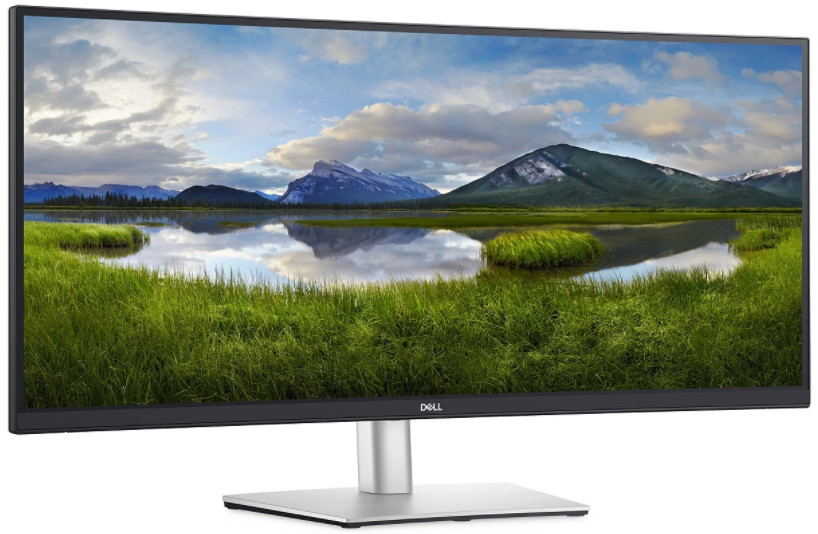
See more and achieve more at home or in the office on this 34-inch ultrawide WQHD (3440 x 1440) curved screen. With more onscreen space, you can multitask effectively—without the need for a dual monitor setup. Plus, the three-sided, ultra-thin borders let you dive in without distraction.
All-encompassing view
The 3800R screen curvature creates an ultrawide 21:9 field of view, minimizes reflection and offers near uniform visual focus, for a more comfortable visual experience over extended viewing periods.
Unparalleled focus
Focus more on your work at home or in the office with a panoramic view, extended peripheral vision and incredible depth.
Consistent views
Expect seamless, wide viewing angles no matter where you sit, thanks to IPS technology.
Designed with you in mind
Navigate the menu and adjust screen settings with the easy-to-use joystick control. We’ve also given you the option to effortlessly snap on the magnetic Dell Slim Soundbar - SB521A. It’s time to elevate your listening experience.
Beauty meats function
This sleek monitor features a small base and an improved cable management design that hides cables in the monitor riser, for a clutter free desk space at your office or home office.
Comfort is key
Tilt, swivel and adjust the height of your monitor to a maximum of 150mm because you should be comfortable however and wherever you work.
Easy on the eyes
Optimize eye comfort with a flicker-free screen and ComfortViewi, a feature that reduces harmful blue light emissions.
The power of USB-C
Get up to 65W of power delivery via USB-C, so you can keep your laptop battery full and enjoy uninterrupted productivity. This single-cable solution also saves up to 72% of workspace setup time, reduces cable clutter and transmits power, data and audio—all at once.
Multitask efficiently
Connect two PCs to the monitor and display the content at the same time with Picture-by-Picture (PbP) and Picture-in-Picture (PiP) features. Use the KVM (keyboard, video and mouse) feature to edit content from two different PCs using a single keyboard and mouse.
Quick convenience
Plug in whatever you need and keep it in reach with the two, SuperSpeed USB 5Gbps (USB 3.2 Gen1) quick access ports.
Productivity at every level
Easy Arrange allows you to easily tile multiple applications across one or more screens with 38 pre-set window partitions and the ability to personalize up to five windows, giving you improved multitasking abilities.
Seamless transitions
The auto-restore feature remembers where you left off, so applications will go back to where you left them, even after you’ve unplugged.
More ways to manage
Asset management reports allow IT managers to quickly capture and track monitor information as well as configure multiple monitors at once through a single setup.
The key to convenience
Shortcut keys can save you even more time, letting you easily configure your display management settings so you can get to work faster.
Environmental standards
This monitor meets the latest regulatory and environmental standards such as EnergyStar®, EPEAT®i, China Energy Label CEL and CECP.
Eco-conscious packaging
To reduce our manufacturing impact on the environment, this monitor is shipped Styrofoam-free and the packaging is made of at least 75% recycled cardboard.
Energy conservation
Save energy when your monitor is not in use with PowerNapi, a feature that dims or puts your monitor to sleep when it’s not in use.
Advancing sustainability
Dell Technologies is committed to reducing environmental impact throughout the product lifecycle. Read more about our commitment to sustainability and our 2030 Social Impact goals, and our product’s carbon footprint.
Immersive productivity
See more and achieve more at home or in the office on this 34-inch ultrawide WQHD (3440 x 1440) curved screen. With more onscreen space, you can multitask effectively—without the need for a dual monitor setup. Plus, the three-sided, ultra-thin borders let you dive in without distraction.
All-encompassing view
The 3800R screen curvature creates an ultrawide 21:9 field of view, minimizes reflection and offers near uniform visual focus, for a more comfortable visual experience over extended viewing periods.
Unparalleled focus
Focus more on your work at home or in the office with a panoramic view, extended peripheral vision and incredible depth.
Consistent views
Expect seamless, wide viewing angles no matter where you sit, thanks to IPS technology.
Designed with you in mind
Navigate the menu and adjust screen settings with the easy-to-use joystick control. We’ve also given you the option to effortlessly snap on the magnetic Dell Slim Soundbar - SB521A. It’s time to elevate your listening experience.
Beauty meats function
This sleek monitor features a small base and an improved cable management design that hides cables in the monitor riser, for a clutter free desk space at your office or home office.
Comfort is key
Tilt, swivel and adjust the height of your monitor to a maximum of 150mm because you should be comfortable however and wherever you work.
Easy on the eyes
Optimize eye comfort with a flicker-free screen and ComfortViewi, a feature that reduces harmful blue light emissions.
The power of USB-C
Get up to 65W of power delivery via USB-C, so you can keep your laptop battery full and enjoy uninterrupted productivity. This single-cable solution also saves up to 72% of workspace setup time, reduces cable clutter and transmits power, data and audio—all at once.
Multitask efficiently
Connect two PCs to the monitor and display the content at the same time with Picture-by-Picture (PbP) and Picture-in-Picture (PiP) features. Use the KVM (keyboard, video and mouse) feature to edit content from two different PCs using a single keyboard and mouse.
Quick convenience
Plug in whatever you need and keep it in reach with the two, SuperSpeed USB 5Gbps (USB 3.2 Gen1) quick access ports.
Productivity at every level
Easy Arrange allows you to easily tile multiple applications across one or more screens with 38 pre-set window partitions and the ability to personalize up to five windows, giving you improved multitasking abilities.
Seamless transitions
The auto-restore feature remembers where you left off, so applications will go back to where you left them, even after you’ve unplugged.
More ways to manage
Asset management reports allow IT managers to quickly capture and track monitor information as well as configure multiple monitors at once through a single setup.
The key to convenience
Shortcut keys can save you even more time, letting you easily configure your display management settings so you can get to work faster.
Environmental standards
This monitor meets the latest regulatory and environmental standards such as EnergyStar®, EPEAT®i, China Energy Label CEL and CECP.
Eco-conscious packaging
To reduce our manufacturing impact on the environment, this monitor is shipped Styrofoam-free and the packaging is made of at least 75% recycled cardboard.
Energy conservation
Save energy when your monitor is not in use with PowerNapi, a feature that dims or puts your monitor to sleep when it’s not in use.
Advancing sustainability
Dell Technologies is committed to reducing environmental impact throughout the product lifecycle. Read more about our commitment to sustainability and our 2030 Social Impact goals, and our product’s carbon footprint.
Bieži pirkts kopā

TOP prece

0 € uz pakomātu

0 € uz pakomātu
0 € uz pakomātu