Preces informācija
Eizo ColorEdge CS230
Preces apraksts angļu valodā:
ColorNavigator 6 Color Management Software
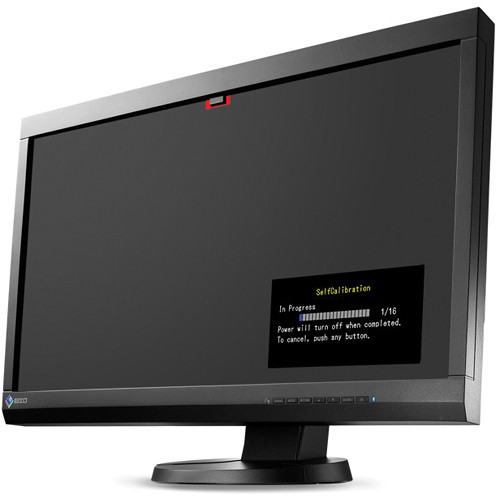
To properly manage color in your work, it is necessary to ensure your monitor maintains consistent settings. The bundled ColorNavigator 6 software allows you to easily carry out calibration. Simply select the desired preset or assign values for brightness, white point, and gamma. ColorNavigator 6 is compatible with a wide range of measurement devices from X-Rite, DataColor, and other manufacturers.
 Built-in Correction Sensor Automatically Maintains Your Settings
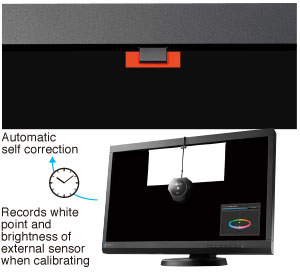
The CS230 is equipped with a built-in correction sensor housed within the front upper bezel. This sensor records your adjustment results, and maintains the white point and brightness values by automatically readjusting the settings at specific intervals that you determine. Even if the monitor is switched off or not connected to a computer, it will stick to its preset schedule and self correct.
The built-in correction sensor works with ColorNavigator 6 to automatically maintain your settings.
EIZO-Developed ASIC at the Core
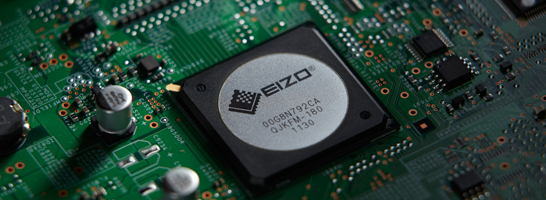
All ColorEdge models come with an ASIC (application specific integrated circuit) developed by EIZO to meet the needs of the graphics market. The ASIC has its own algorithms used in high-precision color processing to produce smooth color tones.
Brightness and Color Uniformity with DUE
Fluctuations in brightness and chromaticity on different parts of the screen are a common trait of LCD monitors. To counteract this, the monitor incorporates EIZO's patented digital uniformity equalizer (DUE) technology.
Individually Adjusted at the Factory
The gamma level for each ColorEdge monitor is adjusted at the factory. This is accomplished by measuring the R, G, and B gamma values from 0 – 255, then using the monitor’s 16-bit look-up table (LUT) to select the 256 most appropriate tones to achieve the desired value.
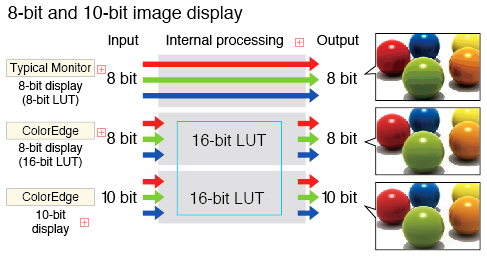
10-Bit Simultaneous Display
Using the DisplayPort input, the monitor offers 10-bit simultaneous color display* from a 16-bit look-up table which means it can show more than one billion colors simultaneously. This is 64 times as many colors as you get with 8-bit display which results in even smoother color gradations and reduced Delta-E between two adjacent colors.
*A graphics board and software which support 10-bit output are also necessary for 10-bit display.
Multiple Inputs
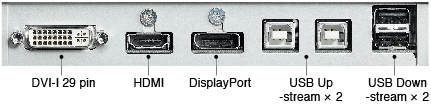
DisplayPort, HDMI, and DVI-I inputs are included for connecting to various types of graphics boards, The HDMI input also offers direct connection with digital cameras. Two USB upstream ports allow two computers to be connected at once so it’s not necessary to reconnect the USB cable when using the ColorNavigator software and switching between the two computers.
Smooth Display of Video
For video editing or post production work, an overdrive circuit is included to reduce gray-to-gray response time to ensure that moving images look clean and sharp with a minimum of ghosting.
Adjustable Stand
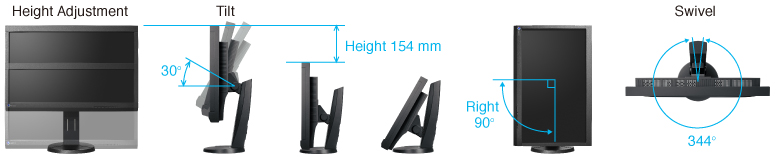
Adjust the screen to the most comfortable angle for you and reposition it to show your work to a colleague or client. The monitor comes with a versatile stand that offers height, tilt, and swivel adjustments as well as portrait mode display.
Preset Modes for Optimum Viewing
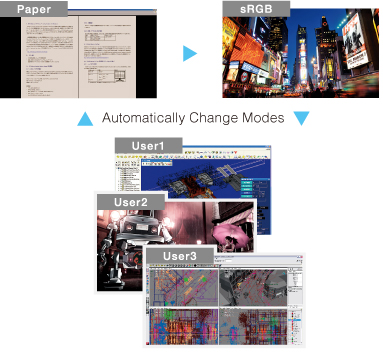
6 preset modes are included: Paper, sRGB, Calibration, and three user- adjustable modes. With the bundled ScreenManager for Pro (compatible with Windows OS only), you can assign a mode to an application so that mode will automatically be come active when you call up an application.
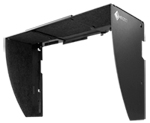
Optional Shading Hood for Portrait and Landscape Modes
Most shading hoods can only be used in landscape mode, but a unique hood that is designed for portrait mode as well is available as an option.
Preces apraksts angļu valodā:
ColorNavigator 6 Color Management Software
To properly manage color in your work, it is necessary to ensure your monitor maintains consistent settings. The bundled ColorNavigator 6 software allows you to easily carry out calibration. Simply select the desired preset or assign values for brightness, white point, and gamma. ColorNavigator 6 is compatible with a wide range of measurement devices from X-Rite, DataColor, and other manufacturers.
The CS230 is equipped with a built-in correction sensor housed within the front upper bezel. This sensor records your adjustment results, and maintains the white point and brightness values by automatically readjusting the settings at specific intervals that you determine. Even if the monitor is switched off or not connected to a computer, it will stick to its preset schedule and self correct.
The built-in correction sensor works with ColorNavigator 6 to automatically maintain your settings.
EIZO-Developed ASIC at the Core
All ColorEdge models come with an ASIC (application specific integrated circuit) developed by EIZO to meet the needs of the graphics market. The ASIC has its own algorithms used in high-precision color processing to produce smooth color tones.
Brightness and Color Uniformity with DUE
Fluctuations in brightness and chromaticity on different parts of the screen are a common trait of LCD monitors. To counteract this, the monitor incorporates EIZO's patented digital uniformity equalizer (DUE) technology.
Individually Adjusted at the Factory
The gamma level for each ColorEdge monitor is adjusted at the factory. This is accomplished by measuring the R, G, and B gamma values from 0 – 255, then using the monitor’s 16-bit look-up table (LUT) to select the 256 most appropriate tones to achieve the desired value.
10-Bit Simultaneous Display
Using the DisplayPort input, the monitor offers 10-bit simultaneous color display* from a 16-bit look-up table which means it can show more than one billion colors simultaneously. This is 64 times as many colors as you get with 8-bit display which results in even smoother color gradations and reduced Delta-E between two adjacent colors.
*A graphics board and software which support 10-bit output are also necessary for 10-bit display.
Multiple Inputs
DisplayPort, HDMI, and DVI-I inputs are included for connecting to various types of graphics boards, The HDMI input also offers direct connection with digital cameras. Two USB upstream ports allow two computers to be connected at once so it’s not necessary to reconnect the USB cable when using the ColorNavigator software and switching between the two computers.
Smooth Display of Video
For video editing or post production work, an overdrive circuit is included to reduce gray-to-gray response time to ensure that moving images look clean and sharp with a minimum of ghosting.
Adjustable Stand
Adjust the screen to the most comfortable angle for you and reposition it to show your work to a colleague or client. The monitor comes with a versatile stand that offers height, tilt, and swivel adjustments as well as portrait mode display.
Preset Modes for Optimum Viewing
6 preset modes are included: Paper, sRGB, Calibration, and three user- adjustable modes. With the bundled ScreenManager for Pro (compatible with Windows OS only), you can assign a mode to an application so that mode will automatically be come active when you call up an application.
Optional Shading Hood for Portrait and Landscape Modes
Most shading hoods can only be used in landscape mode, but a unique hood that is designed for portrait mode as well is available as an option.
Bieži pirkts kopā

TOP prece

Smart leasing 10