Preces informācija
Powering On and Off
To power on the headset, press the Phone Button and the Jog Dial at the same time while hearing ascending beeps and a voice prompt, “Hello”. To power off the headset, press the Phone Button and the Jog Dial at the same time while hearing descending beeps and a voice prompt, “Goodbye”.
Charging
You can charge the headset by connecting the supplied USB power & data cable into a computer’s USB port or USB wall charger. You can use any standard micro USB cable to charge the units. You can also charge them on the road using the cigarette charger. The charging LED turns red while charging and turns blue when fully charged. It takes about 2.5 hours to be completely charged
Checking the battery
You can check the battery level in two different ways when the headset is powering on.
LED Indicator
When the headset is powering on, the red LED flashes rapidly indicating the battery level.
4 flashes = High, 70~100%
3 flashes = Medium, 30~70%
2 flashes = Low, 0~30%
Voice Prompt Indicator
When you power on the headset, keep pressing the Jog Dial and Phone Button simultaneously for about 3 seconds until you hear high tone triple beeps. Then you will hear voice prompt indicating the battery level. However, if you release the buttons as soon as the headset turns on, you will not hear the voice prompt of battery level indication.
Volume Adjustment
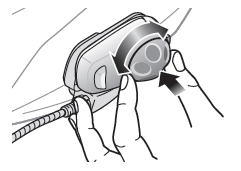
You can easily adjust the volume by rotating the Jog Dial. You will hear a beep when the volume reaches maximum or minimum level. The volume is set and maintained independently at different levels for each audio source even when you turn off and on the headset. For example, once you set the volume for mobile phone handsfree, it will not change even if you adjust the volume when you hear Bluetooth MP3 music. So you can always maintain the preferred optimum volume level for each audio source.
Pairing Mobile phone
1. Turn on the SMH5 MultiCom and press the Phone Button for 5 seconds until the LED flashes red and blue alternately and you hear multiple beeps. You will hear a voice prompt saying “Phone pairing”.
2. Search for Bluetooth devices on your mobile phone. Select the Sena SMH5 MultiCom in the list of the devices detected on the mobile phone.
3. Enter 0000 for the PIN. Some mobile phones may not ask for the PIN.
4. The mobile phone confirms that pairing has completed and the SMH5 MultiCom is ready to use. You will hear a voice prompt from the SMH5 MultiCom saying “Your headset is paired”.
5. If the pairing process is not completed within three minutes, the SMH5 MultiCom will return to stand-by mode.
GPS pairing
Second Mobile Phone Pairing
Typical Bluetooth headsets can connect with only one Bluetooth device, but second mobile phone pairing allows the headset to connect with another Bluetooth device such as GPS or Sena SR10, Bluetooth adapter.
1. To pair the second mobile phone, press the Jog Dial for 5 seconds until the red LED is rapidly flashing and you hear multiple beeps.
2. Within 2 seconds, tap the Phone Button, then the LED turns to blue flashing and the beeps turn to high tone double beeps. You will hear a voice prompt saying “Second Mobile Phone Pairing”.
3. Search for Bluetooth devices on your mobile phone. Select the SMH5 MultiCom in the list of the devices detected on the mobile phone.
4. Enter 0000 for the PIN. Some mobile phones may not ask for the PIN.
5. The mobile phone confirms that the pairing has completed and the SMH5 MultiCom is ready to use. You will hear a voice prompt from the SMH5 MultiCom saying “Your headset is paired”.
Note:
1. You have to use a motorcycle specific GPS, which transmits turn-by-turn voice instructions to the headset by Bluetooth. Most automotive GPS systems do not have this feature.
2. The Sena SR10 is a Bluetooth two-way radio adapter for group communication, and uses Hands-Free Profile. The incoming audio from the two-way radio via SR10 is heard in the background while having an intercom conversation or a mobile phone call.
3. The GPS navigation or a radar detector could be connected to the SR10 by wire. The GPS voice instruction or the radar detector alarm is also heard in the background via SR10 while having an intercom conversation or a phone call. Please refer to the SR10 User’s Guide for details.
Mobile Phone Call Making and Answering
1. When you have an incoming call, simply tap the Phone Button or the Jog Dial to answer the call.
2. You can also answer the incoming call by loudly speaking any word of your choice if Voice Activated Phone Answering (VOX Phone) is enabled, unless you are connected to intercom.
3. To end a call, tap the Phone Button or press the Jog Dial for 2 seconds until you hear a mid-tone single beep, or wait for the called person to end the call.
4. To reject a call, press the Jog Dial for 2 seconds until you hear a beep while the phone is ringing.
5. There are several ways to make a phone call:
– Enter numbers on your mobile phone’s keypad and make a call. Then the call is automatically transferred to the headset.
– Tap the Phone Button in stand-by mode to activate the voice dialer of your mobile phone. For this, the voice dialing function must be available on the mobile phone. Refer to your mobile phone manual for further instruction.
The Bluetooth audio device must be paired with the SMH5 MultiCom. The SMH5 MultiCom supports the Audio/ Video Remote Control Profile (AVRCP), so if your Bluetooth audio device also supports the AVRCP, you can use the SMH5 MultiCom to remotely control music playback. Not only can you adjust the volume but you can also use functions such as play, pause, next track and previous track.
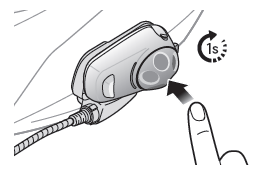
1. To play or pause music, press and hold the Jog Dial for 1 second until you hear a double beep.
2. To adjust the volume, rotate the Jog dial.
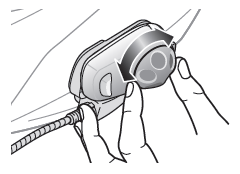
3. To track forward or trackback, rotate while pressing the Jog Dial clockwise or counterclockwise.
Music Sharing
You can start sharing music with an intercom friend using Bluetooth stereo music during a two-way intercom conversation. When you terminate music sharing, you can go back to the intercom conversation. To start or terminate sharing music, press the Jog Dial for 1 second during an intercom conversation until you hear a double beep. To track forward or trackback, rotate while pressing the Jog Dial clockwise or counterclockwise.
Bieži pirkts kopā